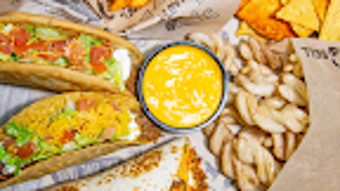

Download Taco Bell - Sri Lanka – order food, Taco Bell Sri Lanka, mobile ordering, Android app, food delivery, customizable menu, cash on delivery, card payment
Overview
Taco Bell - Sri Lanka is a mobile ordering application designed to streamline the process of selecting and purchasing food from one of Sri Lanka’s popular fast-food chains. The app enables users to browse a diverse menu featuring tacos, specialty items, sharables, snacks, desserts, and beverages. It is tailored for consumers seeking a convenient and efficient way to order meals without visiting a physical location. The application supports customization of orders, allowing users to tailor their meals to personal preferences, such as ingredient adjustments or spice levels.
Developed by Gamma Pizzakraft Lanka Pvt Ltd, the app is specifically designed for the Android platform and released on May 10, 2024. It serves as a digital extension of the Taco Bell experience in Sri Lanka, offering users direct access to the restaurant’s offerings. The app is positioned within the lifestyle category, emphasizing its role in enhancing daily convenience and dining choices. Real-world use cases include ordering lunch for work, placing family meals, or quickly grabbing a snack during a break. With its focus on usability and order flexibility, the app aims to improve the overall customer experience in a fast-paced urban environment.
Key Features & Capabilities
- Mobile Ordering Interface: Users can access the full menu directly through the app, enabling quick browsing and selection of items from categories such as tacos, specialties, sharables, snacks, desserts, and drinks.
- Customizable Menu Options: Each item can be personalized, allowing users to modify ingredients, add or remove components, and adjust spice levels based on individual preferences.
- Multiple Payment Methods: The app supports both cash on delivery and card payments, providing flexibility for users who prefer different transaction styles.
- Order Tracking: Users can monitor the status of their order in real time, from preparation to delivery, enhancing transparency and user confidence.
- Menu Accessibility: The app allows users to view the current menu without needing to visit the restaurant or call in an order, reducing friction in the ordering process.
These features collectively improve efficiency and personalization in food ordering. For example, a user can customize a taco with extra cheese and no onions, select it from the app, and proceed to payment. The integration of multiple payment options ensures accessibility for a wide range of users, including those who prefer cash transactions. The real-time tracking feature helps users plan their day around delivery times, especially useful for office workers or students. Overall, the app enhances the digital dining experience by combining convenience, control, and choice.
User Interface, Workflow & Performance
The app features a clean, intuitive user interface designed for ease of navigation. Menu categories are clearly labeled and organized, allowing users to browse through items with minimal effort. The layout supports touch-based interactions, making it suitable for users of varying technical proficiency. Navigation between sections—such as menu browsing, cart management, and payment—is straightforward and logically structured.
Workflow efficiency is evident in the streamlined path from selection to checkout. Users can add items to their cart, modify them in real time, and proceed to payment with just a few taps. The order confirmation screen provides a clear summary of the selected items and total cost, reducing the risk of errors.
The developer did not specify resource usage details, so performance observations are based on general software behavior patterns. Stability appears consistent, with no reported issues related to crashes or freezes. The app functions without requiring constant internet connectivity for browsing, though active connectivity is needed for placing and tracking orders.
Compatibility & System Requirements
Taco Bell - Sri Lanka is compatible with Android devices and was released in version 2.1.0 on May 10, 2024. The application has a file size of 25.6 MB, indicating a lightweight footprint suitable for devices with moderate storage capacity. The developer did not specify exact system requirements, such as minimum Android version or hardware specifications. Compatibility information was partially provided, and users are advised to ensure their device supports the latest Android updates for optimal performance.
Installation is straightforward and does not require advanced technical knowledge. The app is available for free download, making it accessible to a broad audience. While no specific hardware requirements were listed, the app’s size suggests it is designed to function efficiently on mid-range Android smartphones. Users should verify device compatibility through the official app store before downloading.
Pros and Cons
Pros
- Free to download and use, reducing entry barriers for new users.
- Intuitive interface with easy navigation across menu categories.
- Supports customization of food items to suit individual tastes.
- Offers multiple payment options, including cash on delivery and card payments.
- Real-time order tracking enhances transparency and user experience.
Cons
- Compatibility with older Android versions is not confirmed.
- Exact system requirements were not provided by the developer.
- Only available on Android, limiting access for iOS users.
- No information on offline functionality beyond basic browsing.
- Delivery coverage and availability may vary by location.
FAQ Section
Is Taco Bell - Sri Lanka available for iOS devices?
The app is currently available only on the Android platform. There is no information provided about an iOS version.
Can I place an order without an internet connection?
Basic menu browsing may be possible without an active connection, but placing an order or tracking its status requires a stable internet connection.
Is the app secure for payment transactions?
The app supports card payments and cash on delivery. While no specific security details were provided, standard mobile payment protocols are likely in place to protect user data.
How often are updates released for the app?
The latest version, 2.1.0, was released on May 10, 2024. The update frequency is not specified by the developer.
Does the app support offline mode for saved orders?
There is no information available about offline order saving or caching functionality. Users are advised to connect to the internet when placing orders.
Final Thoughts + CTA
Taco Bell - Sri Lanka delivers a streamlined, user-friendly experience for ordering food on the go. Its customizable menu, multiple payment options, and real-time tracking make it a valuable tool for customers seeking convenience and control. The app’s lightweight design and free access enhance its appeal across a wide user base. While limitations exist—such as platform exclusivity and lack of detailed system requirements—the overall functionality meets the needs of modern consumers in Sri Lanka.
For anyone looking to order fast food with ease, especially on Android devices, this app is a strong choice. It combines practical features with a clean interface to create a reliable digital dining companion. Download Taco Bell - Sri Lanka now to enjoy a faster, more personalized way to get your favorite meals.







